

CI/CD & Build Pipeline
Blue Dots separates building application images from deploying them. The application repositories build and publish container images; the bluedots-automation repository pins specific image versions and deploys them to a cluster. Understanding this split is the key to the whole delivery pipeline.
The pipeline at a glance
Section titled “The pipeline at a glance”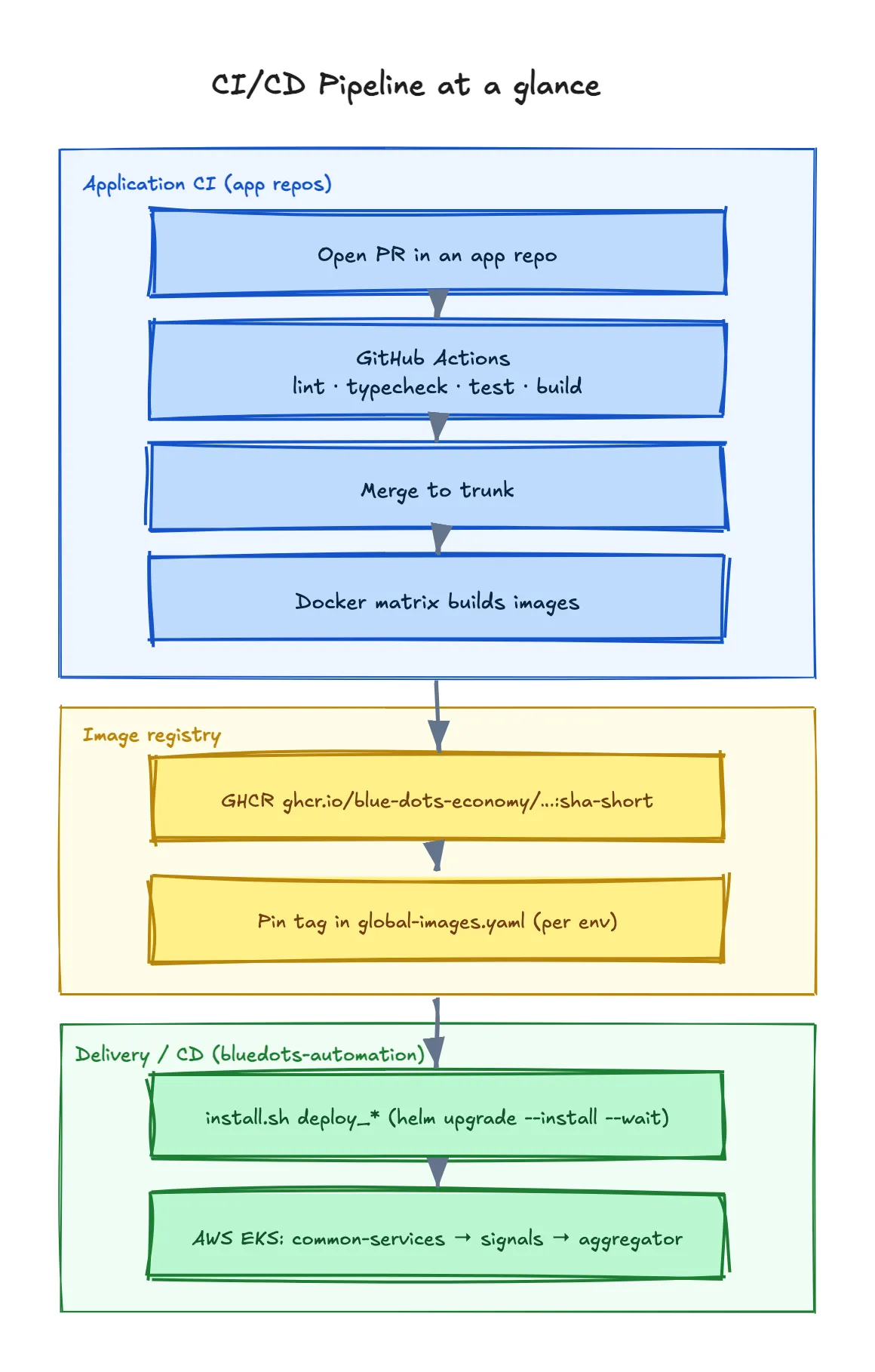
The diagram shows two distinct “CI/CD” surfaces, bridged by the image registry (yellow):
- Application CI (blue) — lives in each app repo. It validates and builds images.
- Delivery / CD (green) — lives in
bluedots-automation. It provisions infrastructure and deploys pinned images with Helm.
1. Application CI (build & publish)
Section titled “1. Application CI (build & publish)”Each application repo runs GitHub Actions on every PR and on pushes:
- Quality gates —
pnpm -w lint,typecheck,test,build, and (foraggregator-dpg)pnpm dep-check. Branch protection requires theCIcheck to pass before merge. - Image build & publish — a Docker matrix builds one image per deployable service and publishes to GitHub Container Registry (GHCR) under
ghcr.io/blue-dots-economy/…. Images are tagged with the commit short SHA (sha-<short>); some services also cut per-app release tags (e.g.web-v*,api-v*,worker-v*).
Representative images (Signals + Aggregator):
| Service | Image |
|---|---|
| Signals API | ghcr.io/blue-dots-economy/signals-dpg/api |
| Signals UI | ghcr.io/blue-dots-economy/signals-dpg/ui |
| Signals search | ghcr.io/blue-dots-economy/signals-search |
| Aggregator API | ghcr.io/blue-dots-economy/aggregator-dpg/api |
| Aggregator web | ghcr.io/blue-dots-economy/aggregator-dpg/web |
| Aggregator worker | ghcr.io/blue-dots-economy/aggregator-dpg/worker |
| Keycloak (custom) | ghcr.io/blue-dots-economy/aggregator-dpg/keycloak-server |
Third-party platform images (Postgres, Redis, cert-manager, Kong) come from their own registries and are pinned the same way.
2. Pinning images for a deployment
Section titled “2. Pinning images for a deployment”The bluedots-automation repo does not build images — it selects them. Each environment has its own opentofu/aws/<env>/global-images.yaml, the single source of truth for image repository, tag and pullPolicy across every service:
# opentofu/aws/<env>/global-images.yaml (excerpt)api: image: repository: ghcr.io/blue-dots-economy/signals-dpg/api tag: "sha-46c05dd" # ← promote by changing this pullPolicy: Alwaysweb: image: repository: ghcr.io/blue-dots-economy/aggregator-dpg/web tag: "sha-15afbce" pullPolicy: AlwaysBecause the file is per-environment, each deployment pins its own tags independently — dev can ride sha-… builds while a production environment stays on a known-good SHA. Promoting a release = updating a tag here and re-running the deploy. The keys map directly to subchart names in the umbrella Helm charts.
3. Delivery (CD) with install.sh
Section titled “3. Delivery (CD) with install.sh”Deployment is driven by opentofu/aws/<env>/install.sh — one script for both cloud bootstrap and Helm deploy (there is no Makefile). Every deploy_* function runs helm upgrade --install … --wait, layering the chart’s own values.yaml, then the generated overlays, then global-images.yaml and global-resources.yaml.
cd opentofu/aws/<env>export GHCR_PAT=ghp_xxxxxxxxxxxx          # read:packages — needed to pull private images
# static checks (install nothing)bash install.sh lint        # helm lint all chartsbash install.sh dry_run     # helm --dry-run against the cluster
# full, ordered deploybash install.sh deploy_all_services
deploy_all_services chains, in strict order:
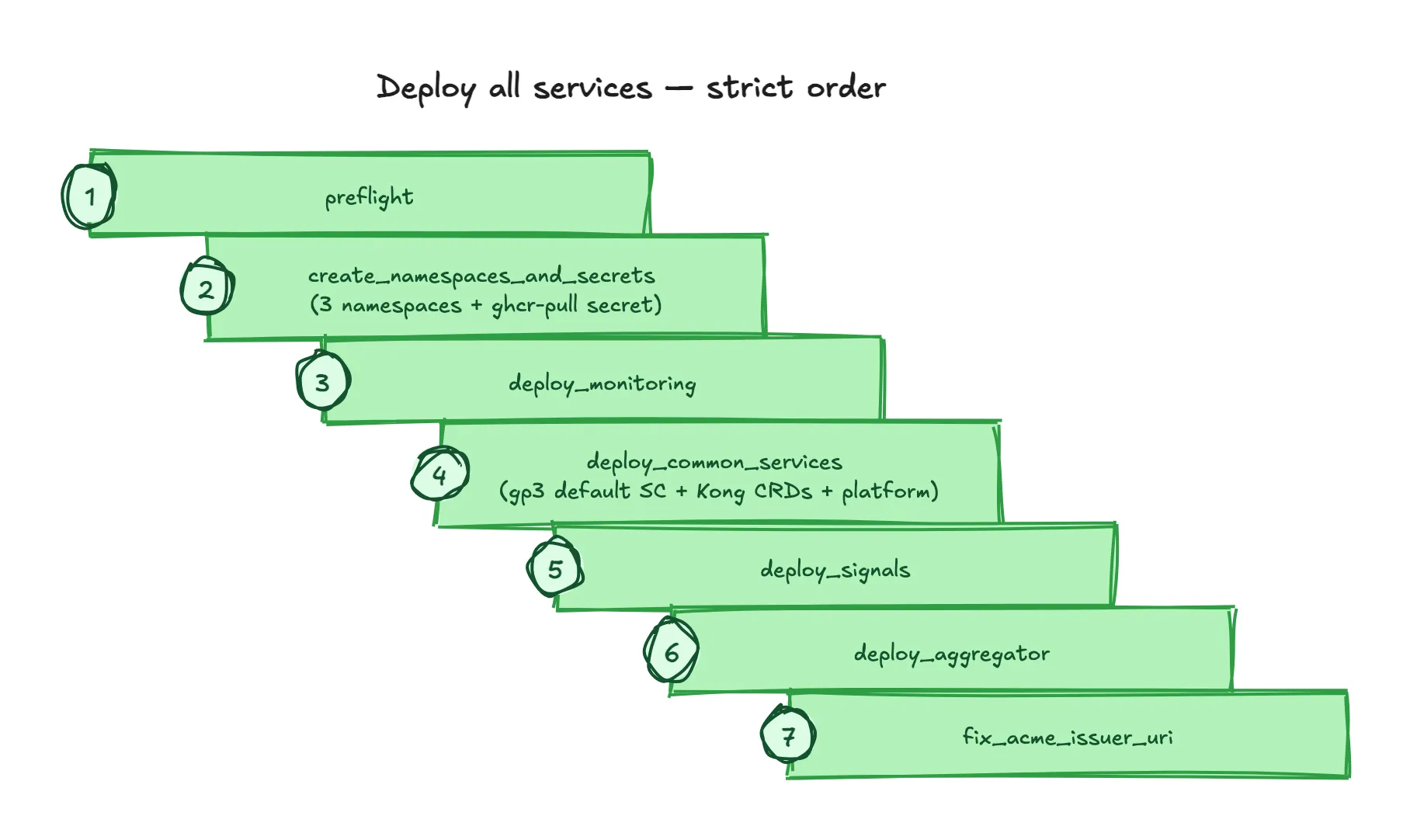
See the Deployment guide for the full step-by-step and validation, and Infrastructure & Deployment Architecture for what each layer is.
Scripted / non-interactive runs
Section titled “Scripted / non-interactive runs”For automation (e.g. a future pipeline), the OpenTofu apply functions honour AUTO_APPROVE=1 for non-interactive terragrunt apply, and GHCR_PAT can be supplied via the environment instead of an interactive prompt:
AUTO_APPROVE=1 GHCR_PAT=ghp_xxx bash install.sh apply_tf_eksGHCR_PAT=ghp_xxx bash install.sh create_namespaces_and_secrets4. Environments & branch strategy
Section titled “4. Environments & branch strategy”Each live deployment has its own long-lived branch carrying that deployment’s config — network schema, image tags, public hostnames, and its own opentofu/aws/<env>/ directory. Work flows up a trunk chain before landing in a deployment branch.
Trunk (promotion chain): <feature-branch> → feature → develop → main.
main— canonical branch; cut new deployment branches from here.develop— pre-release integration.feature— collects in-progress work (often the newest trunk branch).
Per-deployment branches (examples):
| Branch | Env | Notes |
|---|---|---|
blue-dots-dev | dev | |
orange-dots-dev | dev | |
orange-dot-prod | prod | |
purple-dots-prod | prod |
5. How a code change reaches a cluster
Section titled “5. How a code change reaches a cluster”- Open a PR in an app repo → CI runs lint/typecheck/test/build; reviewers approve.
- Merge → the Docker matrix publishes
ghcr.io/blue-dots-economy/<service>:sha-<short>to GHCR. - In
bluedots-automation, on the target environment’s branch, update the relevant tag(s) inopentofu/aws/<env>/global-images.yaml. - Run
bash install.sh deploy_<service>(ordeploy_all_services) — Helm rolls out the new image with--wait. - Validate (
helm list -A, pod health, ingress, TLS) — see the Deployment guide.
Rollback is the inverse: set the tag back to the previous known-good SHA and re-run the deploy.